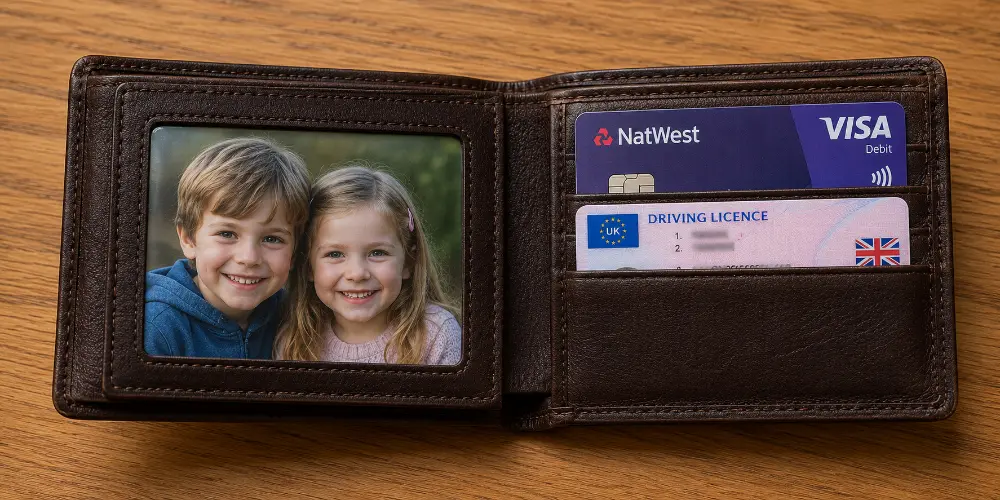
There is something quietly lovely about opening your wallet and finding a familiar face looking back at you. The children when they were small. A partner. A parent who is no longer here. A dog who genuinely believes they own the house. It is a tiny ritual, but a comforting one, repeated dozens of times a day without us ever really noticing.
The frustration begins the moment you try to make one. You crop a picture on your phone, send it off, and what arrives is the wrong shape, oddly soft, or simply too big to slide into the little window in your wallet. It should be the easiest print in the world to order, and somehow it never quite is.
This guide fixes that. We will cover the exact wallet photo size in centimetres, millimetres, inches and even pixels, explain where that measurement comes from, and walk through every sensible way to turn a digital photo into a sharp little print that fits first time. We will also cover the variations nobody tells you about, the mistakes that ruin small prints, and the surprisingly many things you can do with a wallet photo once you have one.
Key Takeaways
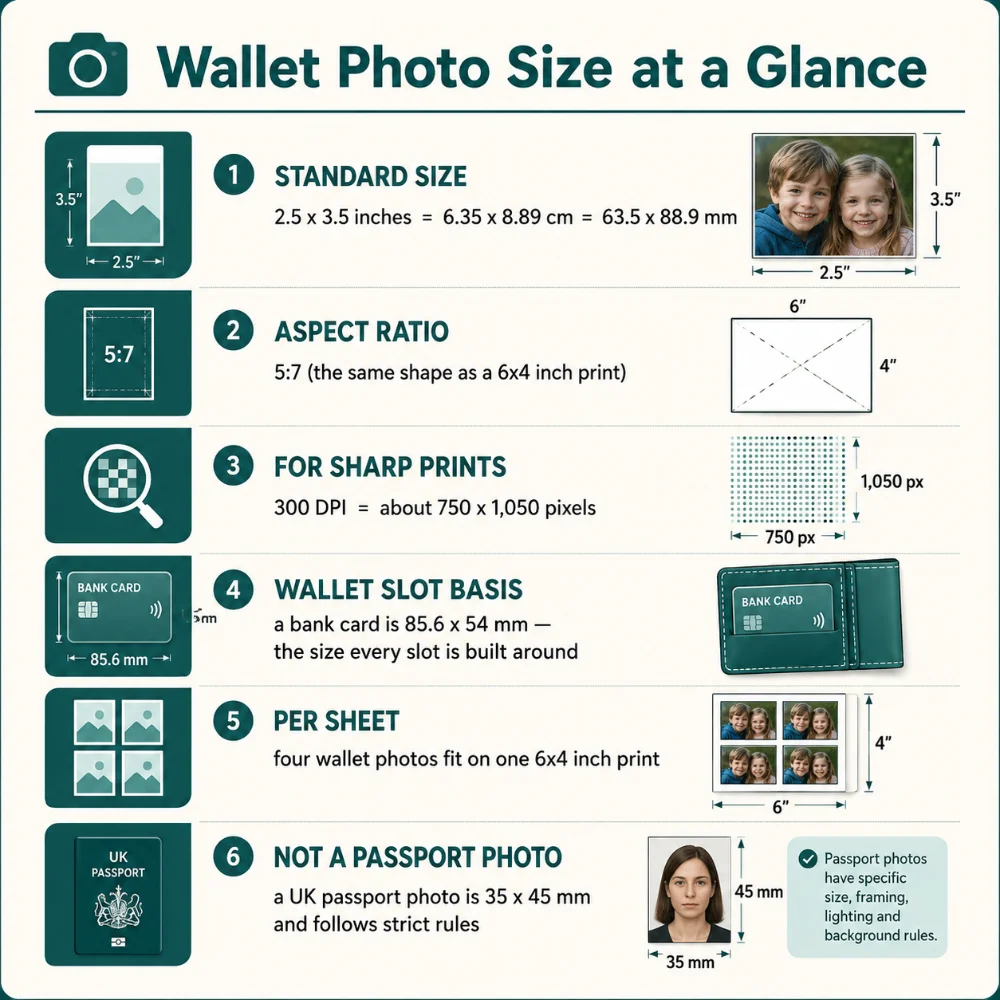
The standard size: A wallet photo is 2.5 x 3.5 inches, which is 6.35 x 8.89 cm or 63.5 x 88.9 mm. Most labs round this to 6.4 x 8.9 cm.
It is the 6x4 shape, shrunk: A wallet photo shares the 5:7 ratio of a standard 6x4 print, so cropping is straightforward.
Quality decides everything: Small prints magnify blur and poor light, so use a sharp photo and aim for 300 DPI.
It is not an official photo: A wallet photo is a keepsake with no rules. A passport photo is a different size and tightly regulated.
What Is a Wallet Photo?
A wallet photo is a small print made to slip into the photo window or card pocket of a wallet, purse or cardholder. The name is wonderfully literal: it is a photograph sized for your wallet, no more complicated than that.
The format has been around for well over a century. Long before phones, a wallet photo was how you carried the people who mattered. Soldiers took them to war, sweethearts swapped them, proud parents produced them at the slightest invitation. Photo studios printed loved ones small precisely so they could be carried, and the habit stuck.
It never really went away, either. If anything, printed photos have quietly returned, because a physical picture you can hold feels far more personal than yet another image buried in a camera roll of ten thousand. A wallet photo is the most portable version of that feeling.
Where Wallet Photos Still Turn Up Today
Keepsakes of family, partners, children and grandchildren
Memorial photos of someone who has died, kept close as a private comfort
Pet photos, because of course
School photo packages, which traditionally include a sheet of wallet prints to hand out
Small gifts and tokens slipped into cards, lockets and keepsakes
What Size Is a Wallet Photo? The Exact Dimensions
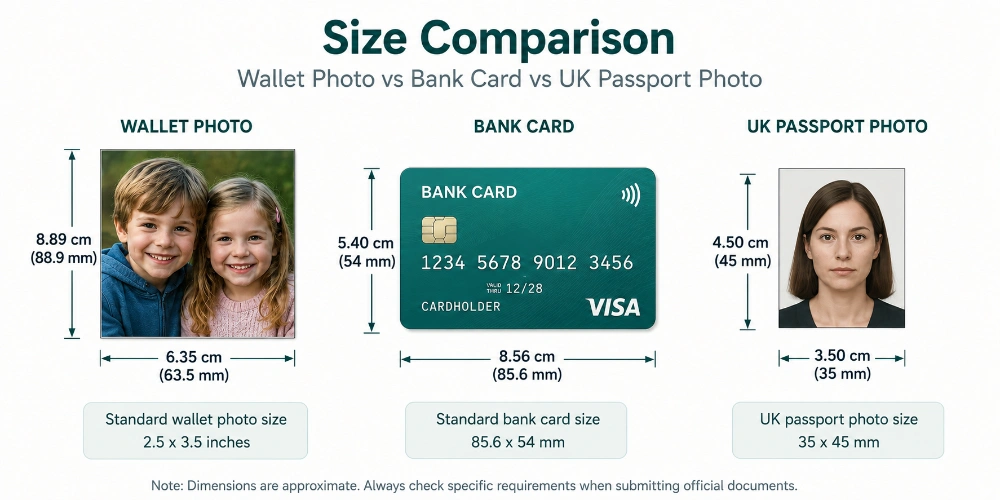
The standard wallet photo size is 2.5 x 3.5 inches. Because we work in metric here in the UK, that is most useful expressed as 6.35 x 8.89 cm, or 63.5 x 88.9 mm. You will often see it rounded to a friendlier 6.4 x 8.9 cm, and that is perfectly fine for ordering.
This is the size used by the overwhelming majority of photo labs, print shops and school photographers. When someone says "wallet size" without any further detail, this is what they mean.
Every Unit, in One Place
Unit
Width
Height
Inches
2.5 in
3.5 in
Centimetres
6.35 cm
8.89 cm
Millimetres
63.5 mm
88.9 mm
Pixels at 300 DPI
750 px
1,050 px
Pixels at 150 DPI
375 px
525 px
What About the Aspect Ratio?
A wallet photo has an aspect ratio of 5:7. That is simply 2.5 to 3.5 reduced down, and it is the same proportion as a standard 6x4 inch photo. You may occasionally see it written as 7:10 on some sites; that describes the same shape from a slightly different rounding, so do not let it confuse you. Keep your crop to 5:7 and you cannot go wrong.
Why does the ratio matter? Because if you crop your photo to the wrong shape before printing, the lab either squashes the image or trims part of it away. Getting the ratio right first means the picture you see is exactly the picture you get.
Why Is a Wallet Photo This Particular Size?
The answer lives in your wallet. Almost every wallet, purse and cardholder made anywhere in the world is built around one fixed measurement: the payment card. Bank cards, debit cards, driving licences and most ID cards all follow the same international standard, known as ISO/IEC 7810 ID-1, which sets them at 85.6 x 54 mm. Because every slot, pocket and window is designed to hold that shape, the photo had to be designed around it too.
A 2.5 x 3.5 inch photo is fractionally larger than a card. That small margin of extra height is deliberate. It lets the image sit proudly in the clear window without the top of someone's head vanishing behind the rim, while staying slim enough to tuck away neatly. It is the practical sweet spot between "big enough to see" and "small enough to carry".
If your wallet has only tight card slots and no dedicated photo window, you can trim a wallet photo down to card size (85.6 x 54 mm) so it sits flush like a bank card. We will come back to that trick later.
Wallet Photo Size Variations You Should Know About
"Wallet size" is a standard, not a law. A handful of variations exist, and knowing them saves a lot of head-scratching when a print shop offers you options.
The Standard Wallet (2.5 x 3.5 inches)
The default, and the one to choose unless you have a specific reason not to. Fits the photo windows in most wallets and purses sold in the UK.
The Mini Wallet (1.75 x 2.5 inches)
A smaller version, roughly 4.4 x 6.4 cm. These are handy when you want to fit a photo into a narrow card slot rather than a photo window, or when you simply want to carry several at once. Labs often sell them in larger sets on a single sheet.
Credit Card Size (85.6 x 54 mm)
Trimmed to match a bank card exactly. Ideal for slim, modern wallets that have done away with the traditional photo window and only offer card slots. The photo slides in and out like any other card.
Mini Square Prints (5 x 5 cm and up)
Not strictly a "wallet" size, but these small square prints are popular for the same reasons and fit comfortably in many wallets and phone cases. A nice option if your favourite photo is naturally square.
How Wallet Size Compares Around the World
If you order from an international site, or inherit old photos from relatives abroad, you may meet slightly different conventions. The shape is always small and pocket-friendly; the exact figures wander a little:
Region
Common wallet size
Notes
UK & most of Europe
2.5 x 3.5 in (6.35 x 8.89 cm)
The widely used standard; also offered close to card size
United States
2.5 x 3.5 in
Identical standard; tied to school portrait packages
Some EU labs
55 x 85 mm
Very close to a bank card, for card-slot wallets
Canada
2.25 x 3.25 or 2.5 x 3.5 in
Varies by package
Australia
Wallet sheets
Several photos on one sheet, cut to size at home
Getting the Quality Right (The Part That Actually Matters)
Here is the truth that most size guides skate over: with a wallet photo, the dimensions are the easy bit. The hard bit is quality. A wallet print is small, and small prints are merciless. Any softness, pixelation or murky lighting you might forgive on a large print leaps straight out at you when the whole image is the size of a card.
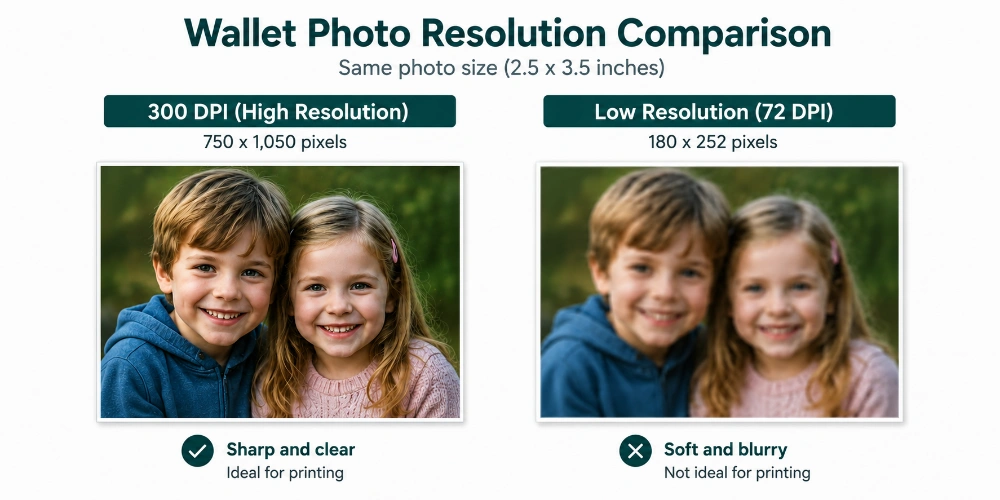
The number to remember is 300 DPI — dots per inch. This is the print-shop standard for a crisp, professional result. At 300 DPI, a 2.5 x 3.5 inch wallet photo needs to be around 750 x 1,050 pixels. Anything noticeably below that risks looking soft once printed.
The reassuring news is that almost any photo taken on a smartphone in the last decade has far more detail than this. A single modern phone photo is often several thousand pixels across, which is many times what a wallet print demands. You rarely need to worry about resolution unless you are working from an old scan, a screenshot, or an image that has been cropped down to a tiny fragment.
How to Check a Photo Will Print Well
Open the photo at full size on your phone or computer screen.
Zoom in on the eyes and any fine detail. Are they genuinely sharp, or just small?
If it looks crisp at full size on screen, it will look excellent as a wallet print.
If it already looks soft, fuzzy or blocky on screen, choose a different photo. Shrinking it will not rescue the detail.
Photos That Shine at Wallet Size
Close-up portraits where a face fills most of the frame
Pictures taken in good, even light
Simple compositions with a single clear subject
Recent phone photos, which carry plenty of detail
Photos to Steer Clear Of
Heavily zoomed shots, where digital zoom has already softened things
Busy group photos, where every individual face ends up tiny
Dark, blurry or heavily filtered pictures
Screenshots, which are usually too low in resolution to print sharply
If you want the underlying logic of pixels, DPI and print sizes explained properly, our guide to the best resolution for prints is worth a few minutes.
Cropping and Resizing Your Photo to Fit
Most phone photos are not the right shape for a wallet print straight out of the camera, so a small crop is almost always needed. The goal is simple: get your image into the 5:7 proportion before you print, so nothing important gets trimmed away by the lab.
A Clean Crop in Three Steps
Open the photo in any editing app and select the crop tool.
Choose a fixed ratio of 5:7 (this matches the wallet shape exactly). If your app offers it, you can instead set a custom size of 6.35 x 8.89 cm.
Position the crop box so the most important part — usually a face — sits comfortably inside, with a little breathing room around it, then save.
That breathing room is more important than it sounds. A face crammed right to the edges looks awkward once it is sitting in the wallet window, and you lose the gentle margin that makes a portrait feel finished. Leave a touch of space at the top and sides.
Free apps such as Snapseed handle fixed-ratio cropping nicely, and the photo editor built into most phones can do it too. There is no need for anything expensive.
Cropping for small prints is really the same skill as cropping for any print. If you would like a wider grounding in print shapes and ratios, our guide to standard photo sizes in the UK covers the full range, from wallet prints up to wall art.
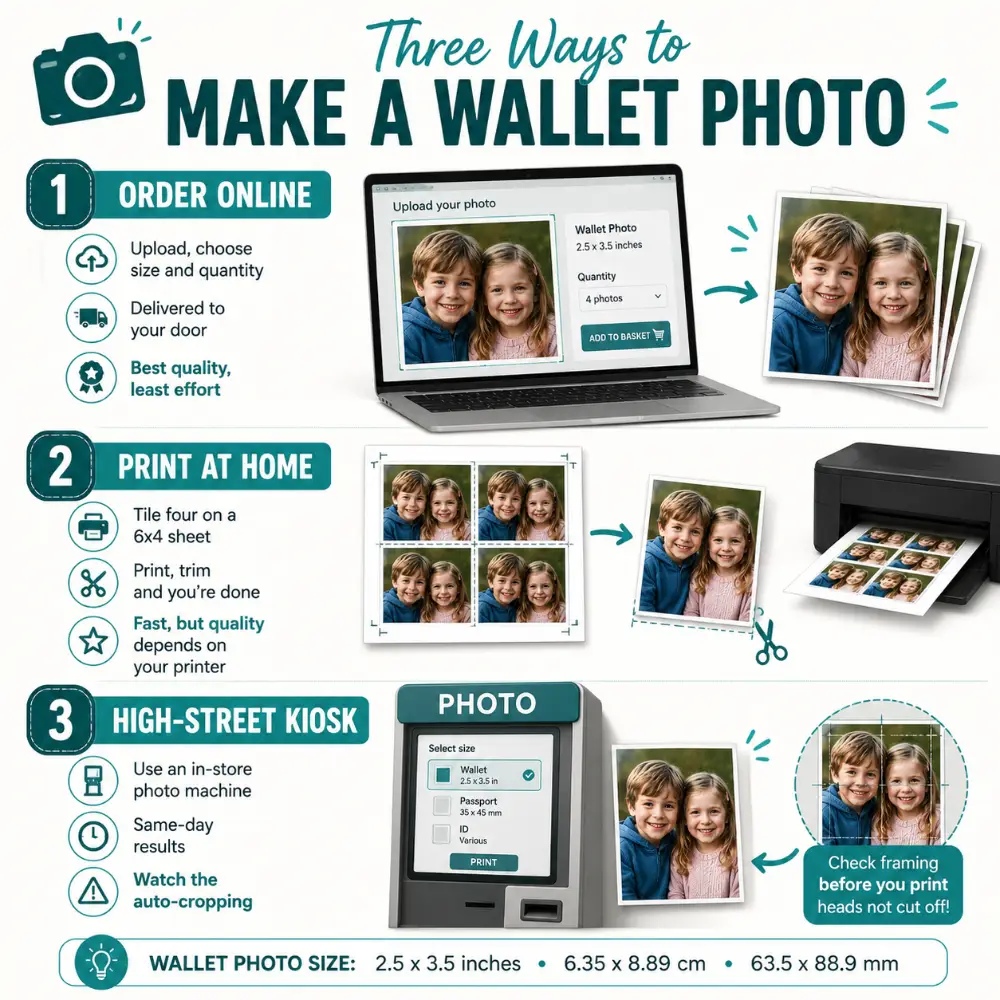
How to Make Wallet Photos: Three Ways
There are three sensible routes to a wallet photo in your hand. We will go through each, with the honest pros and cons, so you can pick whatever suits your situation.
Option 1: Order Prints Online
For most people this is the simplest route and gives the best results by a clear margin. You upload your photo, choose the size and how many copies you want, and a few days later sharp little prints arrive on photo paper. Because they are produced at a proper lab, the quality comfortably beats most home printers, and the colours stay true.
It is also the obvious choice when you want several copies to share. If you are placing an order anyway, turning a favourite shot into a small batch of photo prints means everyone in the family can have their own.
Option 2: Print Wallet Photos at Home
If you own a decent photo printer and want results today, you can make wallet photos at home. The trick is to fit several onto one standard sheet, so you are not wasting expensive photo paper on a single tiny print.
The Four-on-a-Sheet Method
Because a wallet photo is the same shape as a 6x4 inch print, four of them tile neatly onto one 6x4 sheet, two across and two down. The simple version:
Set your image to 2.5 x 3.5 inches (6.35 x 8.89 cm) at 300 DPI in any photo app.
Create a 6x4 inch canvas and place four copies on it, in a two-by-two grid.
Print onto glossy or matte photo paper using your printer's highest quality setting.
Once fully dry, trim along the edges with a guillotine, or a steady hand and sharp scissors.
Most photo software, and a good many free apps, include a ready-made option to print multiple wallet-size copies on one sheet, which lays out the grid for you automatically.
Option 3: Use a High-Street Photo Kiosk
The self-service photo machines in many supermarkets and chemists print wallet sizes too. They are quick and handy when you need something the same day. The one thing to watch is the automatic cropping: these machines often trim your photo to fit the format, so check the on-screen preview carefully and reposition the image so nobody loses the top of their head.
Useful whether you are printing at home or working out how many copies to order:
Sheet size
Wallet photos that fit
6 x 4 inches (15 x 10 cm)
4 photos
7 x 5 inches (18 x 13 cm)
4 photos, with a comfortable border
8 x 6 inches (20 x 15 cm)
6 photos
A4 sheet
8 to 9 photos
Wallet Photos and School Picture Packages
If the phrase "wallet size" takes you straight back to childhood, you are not alone. For decades, school photographers have built their packages around it. A typical order might include one large 8 x 10 print for the wall, a few medium 5 x 7 prints for grandparents, and a sheet of wallet photos to cut up and hand out to friends and family.
That tradition is exactly why the size became a household name. Those little prints were swapped in playgrounds, posted to relatives and tucked into countless purses. The dimensions are the same standard 2.5 x 3.5 inches covered above, which is handy: if you find an old school wallet photo and want to reprint or reframe it, you already know precisely what size you are dealing with.
Framing and Displaying Small Photos
A wallet photo does not have to live in a wallet. These little prints look charming on a desk, a shelf or a bedside table, and framing them is straightforward once you know the size.
Because 2.5 x 3.5 inches is a slightly unusual frame size on the high street, you have two easy options. The first is a small frame with a mount cut to hold a 2.5 x 3.5 inch opening, which gives the photo a tidy border and a finished look. The second is to print the photo a little larger, on a standard small print size, and frame that instead.
The white border around a photo inside a frame is called a mount in the UK. A mount with a bevel-cut opening sized for your wallet photo lets a tiny print sit neatly inside a larger, more common frame, so you are not hunting for an awkward size. If you are choosing frames, our photo frame sizes guide runs through the standard UK options and how mounts work.
Grouping Small Photos Together
Several wallet photos displayed together can be more striking than one on its own. A cluster of small prints in matching frames, or a little row along a shelf, turns a handful of pocket-size pictures into a proper display. Keep the spacing even and the heights consistent and it will look considered rather than accidental.
Digital and Phone "Wallet" Photos
These days, many people keep a digital version too — a favourite photo set as a phone lock screen, or a picture saved in a digital wallet app alongside boarding passes and loyalty cards. The idea is the same as the printed version: keeping someone close, ready at a glance.
Digital wallet photos are not bound by print dimensions. They simply need to look good on screen, so a clear, well-lit image at the resolution of your phone is plenty. Many people do both: a printed wallet photo for the sentiment of something physical, and a digital one for everyday convenience. There is no rule that says you must choose.
Creative Things to Do With Wallet Photos
The wallet is the obvious home, but small prints are far more versatile than that. Some of the nicest uses have nothing to do with carrying them around at all.
Keep Loved Ones Close
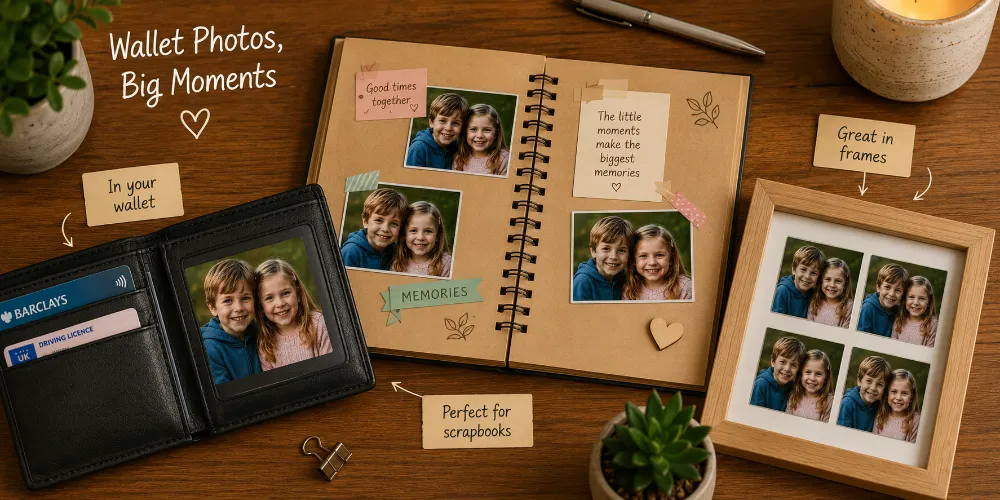
The classic use, and still the best. A photo of your partner, children, parents or a pet, ready to lift the moment every time you reach for a card. Many people keep a memorial photo this way too — a quiet, private way to carry someone who has gone.
Scrapbooks, Albums and Memory Boxes
Their small size makes wallet photos perfect for scrapbooking, for filling the gaps in a larger album, or for layering into a memory box. If you are gathering a whole collection of pictures, it can be worth bringing them together into a single photo book, so the memories live in one place rather than scattered and slowly creasing in drawers.
Slip One Into a Gift or Card
A wallet photo tucked inside a birthday card or present is a small, thoughtful surprise. It works especially well for grandparents and family who live far away. The same little image carried in a different pocket — on a personalised photo keyring — makes a keepsake someone sees every time they pick up their keys.
Make a Mini Magnet Gallery
If one photo is never enough, the same small-print idea works beautifully on the fridge. A set of photo magnets turns a handful of favourites into a little gallery the whole household passes every day, rather than something only you get to enjoy.
Create a Flexible Wall Display
Small photos also make a lovely informal wall display, and you do not need to commit to drilling holes. MIXPIX® photo tiles let you put small images up and rearrange them whenever the mood takes you, so a pocket-size memory can become part of the room.
Looking After Your Wallet Photos
Because they live in pockets and bags, wallet photos take more wear and tear than a framed print ever will. A few small habits keep them looking good for years rather than months.
Keep the original digital file safe, so you can reprint instantly whenever one gets worn or lost.
Use a clear sleeve or a small laminating pouch to guard against creases, sweat and the occasional spill.
Choose a matte finish if you handle the photo a lot — it hides fingerprints far better than gloss.
Keep them out of prolonged direct sunlight, on a dashboard or windowsill, which fades any print over time.
If a print is precious, scan it before it ages, so the image survives even if the paper does not.
Common Mistakes to Avoid
Most wallet-photo disappointments come down to a small handful of avoidable errors. Sidestep these and you will be very happy with the result.
Printing too small or too large. Stick to the standard 2.5 x 3.5 inches unless you have measured your wallet window and know you need a variation.
Ignoring the aspect ratio. Crop to 5:7 before printing, or the lab will trim the shape for you — rarely where you would have chosen.
Using a low-resolution image. A picture that looks soft on screen will look worse on paper. Aim for 300 DPI.
Cropping faces too tightly. Leave a little space around the subject so the portrait does not feel squeezed.
Confusing it with a passport photo. They are different sizes with completely different rules. Never use one for the other.
The Short Version
A wallet photo is 2.5 x 3.5 inches — 6.35 x 8.89 cm, or 63.5 x 88.9 mm — with a 5:7 shape. Keep your image sharp, aim for 300 DPI, and crop to 5:7 before printing. Whether you order online, tile four on a sheet at home, or use a high-street kiosk, you will end up with a small print that fits the window in your wallet and keeps the people you love close at hand.
Small format, big sentiment. That has been the appeal of a wallet photo for over a hundred years, and it is just as true today.
Frequently Asked Questions
What size is a wallet photo in cm?
A standard wallet photo is 6.35 x 8.89 cm, often rounded to 6.4 x 8.9 cm. In other units that is 63.5 x 88.9 mm, or 2.5 x 3.5 inches. This is the size used by most UK photo labs and it fits the photo window in the majority of wallets and purses.
What are the dimensions of a wallet size photo?
The standard dimensions are 2.5 x 3.5 inches, which equals 6.35 x 8.89 cm or 63.5 x 88.9 mm. It shares the 5:7 shape of a 6x4 inch print, just at a smaller scale, which makes it easy to crop for.
What is the aspect ratio of a wallet photo?
A wallet photo has a 5:7 aspect ratio, the same proportion as a standard 6x4 inch print. Some sites describe it as 7:10, but that is the same shape expressed differently. Cropping to 5:7 keeps the image from being squashed or trimmed unexpectedly.
Is a wallet photo the same as a passport photo?
No. A UK passport photo is 35 x 45 mm and must follow strict rules about background, expression and head position. A wallet photo is 63.5 x 88.9 mm and is purely a keepsake, with no rules at all. You cannot use one in place of the other.
How many pixels do I need for a wallet photo?
For a sharp print at 300 DPI, you need around 750 x 1,050 pixels. Almost any photo from a modern smartphone has far more than this, so resolution is rarely a problem unless you are using an old scan, a screenshot, or a heavily cropped image.
Can I print wallet photos at home?
Yes. Because four wallet photos fit on a single 6x4 inch sheet, you can lay them out in your photo software, print onto photo paper at your printer's best setting, and trim them apart. Quality depends on your printer, so for the sharpest results a photo lab is hard to beat.
How many wallet photos fit on a 6x4 print?
Four wallet photos fit neatly on one 6x4 inch (15 x 10 cm) print. A larger 8x6 inch sheet holds six, and an A4 sheet can take eight or nine, which is handy if you want lots of copies to share.
What is a mini wallet photo?
A mini wallet photo measures about 1.75 x 2.5 inches (4.4 x 6.4 cm), smaller than the standard size. It suits narrow card slots and is often sold in larger sets on a single sheet.
Can I make a wallet photo fit a card slot?
Yes. If your wallet only has card slots and no photo window, trim the print to credit card size (85.6 x 54 mm) so it sits flush like a bank card. Keep the important part of the image away from the edges before you cut.
What is the best photo to use for a wallet print?
A clear, well-lit close-up works best, ideally one where the face fills most of the frame. Small prints reveal blur and poor light easily, so choose a sharp photo and avoid heavily zoomed or busy group shots.