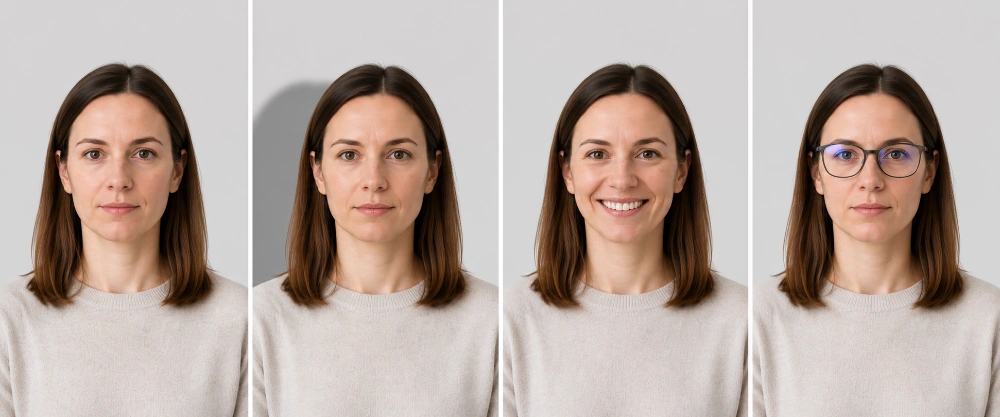
Getting a passport photo sounds like the easy bit. Sit still, look at the camera, done. Yet it is one of the most common reasons a UK passport application gets delayed or sent back. His Majesty's Passport Office (HMPO) rejects a sizeable share of the photos it receives, and the usual culprits are tiny: a shadow on the wall, the ghost of a smile, glasses catching the light, or a background that is the wrong shade of pale.
The rules are strict because your photo has to work with biometric face-matching software, not just look nice. The good news is that once you understand exactly what HMPO is checking for, getting it right at the first attempt is genuinely straightforward.
This guide covers every requirement for 2026 in plain English: exact sizes, the right background, expression, glasses, head coverings, makeup, babies and children, who can sign your photo, the digital photo code system, and the precise mistakes that get applications knocked back. Wherever a rule comes from official guidance, we have based it on the current GOV.UK pages.
Key Takeaways
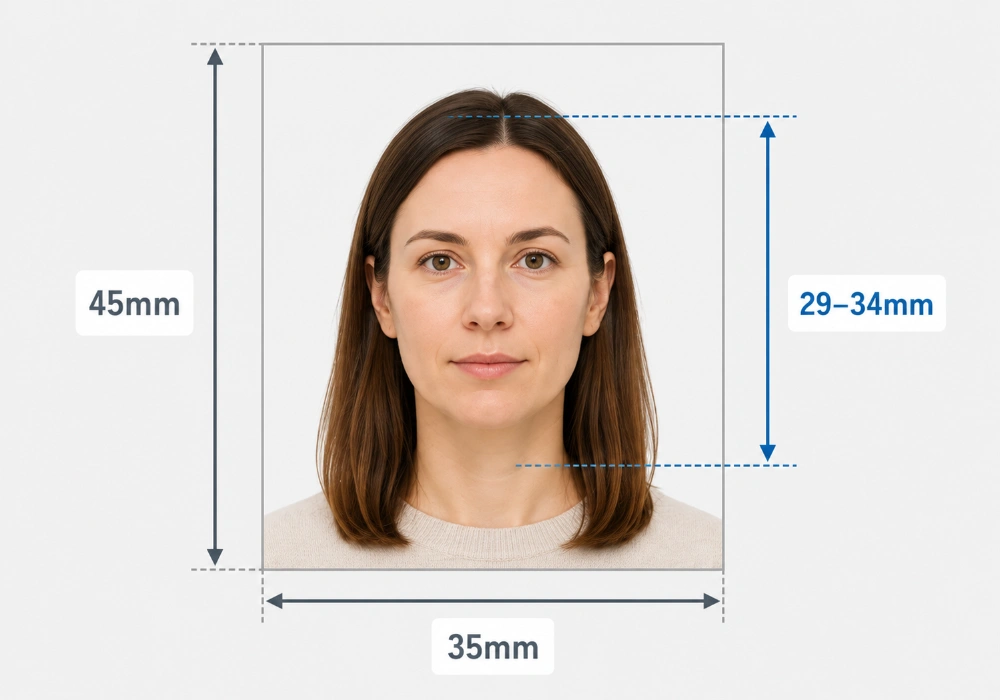
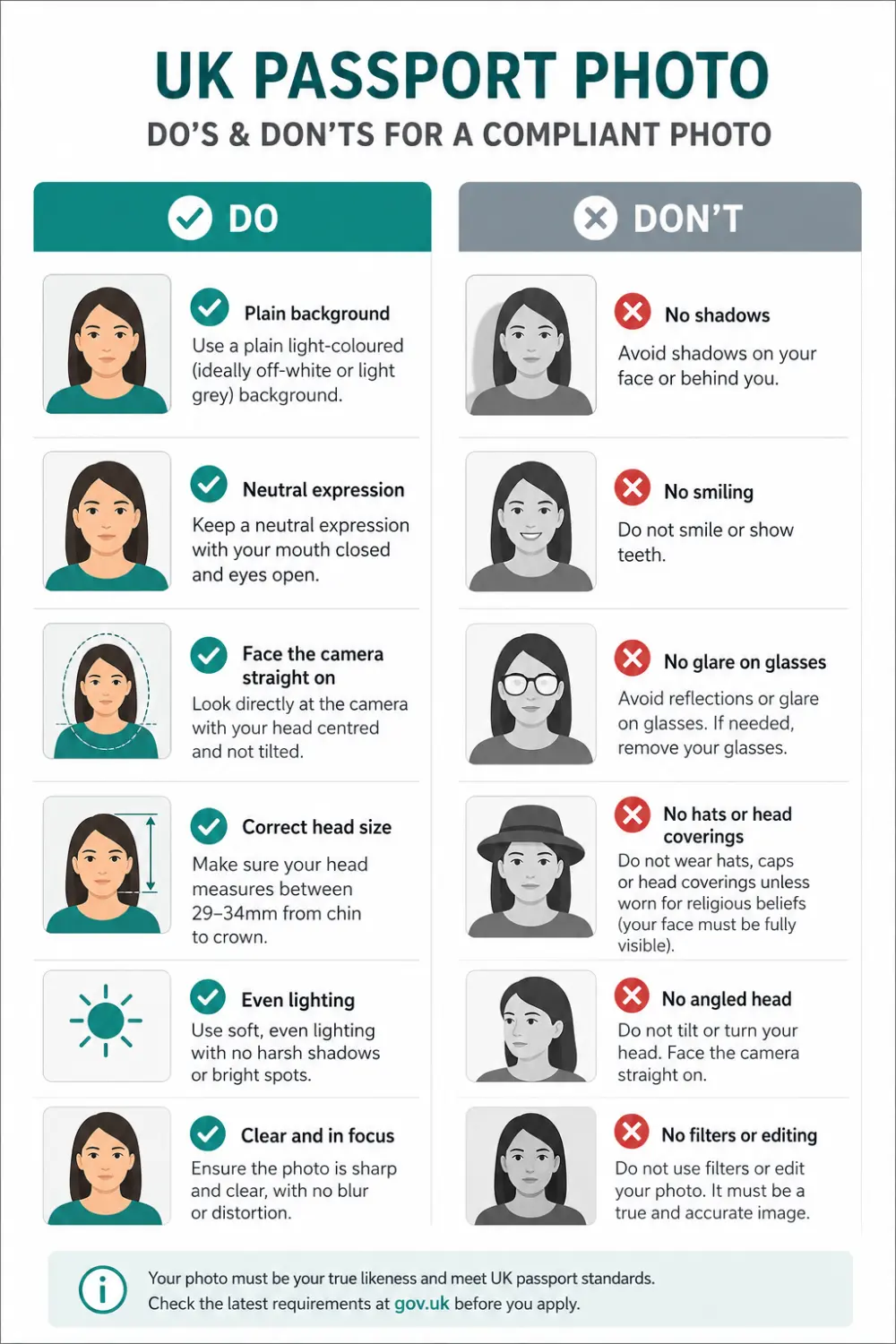
A UK passport photo must be 45mm high by 35mm wide. Your face, from chin to crown, must measure between 29mm and 34mm.
The background must be plain and light-coloured — cream or light grey. Pure white (the US standard) is not advised.
Keep a neutral expression, mouth closed, eyes open and clearly visible. No smiling, no head tilt.
Digital photos need to be at least 600 × 750 pixels, in colour, 50KB–10MB, and unaltered by any software, filter or AI tool.
Your photo must have been taken within the last month, even if your appearance has not changed.
Avoid glasses if you can. If you must wear them: no tints, no glare, no frames covering the eyes.
UK passport photo requirements at a glance
Here is the quick version before we go deep. A UK passport photo must be 45mm high and 35mm wide, taken within the last month, against a plain cream or light grey background, with a neutral expression. For online applications you submit one digital photo; for paper applications you send two identical printed photos.
Requirement
What HMPO asks for
Printed photo size
45mm high × 35mm wide (the standard UK booth size)
Head size in photo
29mm to 34mm from chin to crown
Digital photo resolution
At least 600 × 750 pixels, in colour
Digital file size
Between 50KB and 10MB
Background
Plain and light-coloured — cream or light grey
Expression
Neutral, mouth closed, eyes open and visible
Glasses
Avoid if possible; if worn, no tints, glare or covered eyes
Head coverings
Not allowed except for religious or medical reasons
Age of photo
Taken within the last month
Printed photos needed
2 identical (paper applications only)
Passport photo size and dimensions
The standard UK passport photo is the same size you get from any high-street booth: 45 millimetres tall and 35 millimetres wide. That is the printed size, and it is fixed. HMPO is clear that your photo must not be a cut-down version of a larger picture — so you cannot simply crop a holiday snap to fit.
Inside that little rectangle, the size of your head matters just as much. Measured from the bottom of your chin to the crown of your head — the very top, where your hair naturally sits — your face has to fill between 29mm and 34mm. Too small and your features get lost; too large and the crop looks wrong. This is the single thing people most often get wrong when taking photos at home.
Why the head height rule exists
Biometric systems measure the distances between fixed points on your face — eyes, nose, mouth. If your head is too small or too large in the frame, those measurements fall outside the range the software expects, and the photo fails an automated check before a human ever sees it. Getting the head height right is what turns a nice photo into a compliant one.
Digital passport photo size for online applications
Most people now apply online, uploading one digital photo instead of posting prints. The technical rules are precise: the image must be at least 600 pixels wide and 750 pixels tall, in colour, and saved as a file between 50KB and 10MB. It must be clear, in focus, and completely unaltered by software — no filters, no beauty mode, no AI clean-up.
One detail that surprises people: if you take the photo on your own phone during the application, you do not crop it yourself. You include your head, shoulders and upper body, and HMPO crops it for you. Almost any phone from the last several years easily clears the resolution bar, so file size is rarely the problem — composition and lighting are.
What background colour does a UK passport photo need?
A UK passport photo needs a plain, light-coloured background — ideally cream or light grey. There must be no patterns, objects or other people behind you, and no shadows on the wall. You must also stand in clear contrast to the background, which is why very pale skin and hair against a near-white wall can actually cause a rejection.
This is the rule that catches out people who have had photos taken abroad. American passport photos use a pure white background, and many booths and studios default to white because it suits most countries. The UK does not want stark white. A soft cream or light grey gives the gentle contrast the system looks for.
Background quick rules
Use cream or light grey — never pure white.
No shadows on the wall. Face a window so the light is even and frontal.
Nothing in shot: no shelves, pictures, doorframes, plants or pets.
Stand 30–50cm in front of the wall so you do not cast a shadow.
Expression, glasses, head coverings and makeup
What expression should you have?
Keep it plain. Mouth closed, a neutral expression, eyes open and looking straight down the lens. No grin, no raised eyebrows, no head tilt. It feels oddly stern, but a flat, relaxed face is exactly what the biometric checks want — a smile changes the shape of your eyes and mouth and can fail the match.
Can you wear glasses in a UK passport photo?
You should not wear glasses unless you genuinely have to. If you do, they cannot be sunglasses or tinted, your eyes must be fully visible, and there must be no glare, reflection or shadow from the frames or lenses. The simplest fix by far is to take them off — almost everyone can manage one quick photo without them, and it removes the most common glasses-related rejection in one move.
Head coverings
Head coverings are not allowed unless you wear one for religious or medical reasons. If you do, your full face must still be clearly visible from the bottom of your chin to the top of your face, with nothing casting a shadow across your features and nothing covering your eyes.
Makeup and jewellery
There is no rule banning makeup, but keep it natural. Heavy makeup, strong contouring or anything that noticeably changes how you normally look can cause problems, because the photo has to be a true likeness of your everyday appearance. The same goes for large or reflective jewellery that draws the eye or partly covers your face.
How to take a passport photo at home
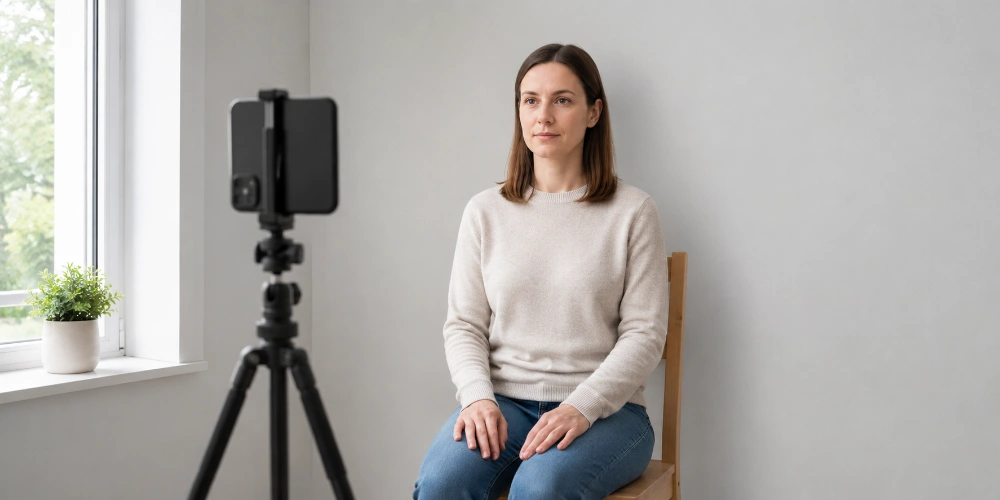
You do not need a studio or a booth. A modern smartphone and a bit of daylight will do the job — the trick is treating it methodically rather than firing off a quick selfie. Here is a step-by-step that reliably produces a compliant shot.
Find a plain, light wall. Cream or light grey is best. Move furniture and pictures out of frame.
Use natural light. Face a window so soft daylight hits your face evenly. Avoid overhead lights — they cast shadows under the eyes and nose.
Step away from the wall. Stand 30–50cm in front of it so you do not throw a shadow behind you.
Get someone to help. Ask them to hold the phone at your eye level, around an arm's length away, and shoot straight on — not from above or below.
Keep a neutral face. Mouth closed, eyes open, looking right at the lens. No smiling, no tilt.
Use the back camera. It is sharper than the selfie camera and gives more natural proportions.
Check on a big screen. Look for glare, shadows, hair across the eyes and red eye before you commit.
Editing is where good intentions go wrong. You can crop and straighten, but you must not retouch, brighten skin, whiten teeth or run any filter — HMPO's checks flag altered images. If you are preparing a photo to print for a paper application and want the colour and sharpness spot-on, our guide to editing photos for printing explains what is safe to adjust and what is not.
Using the free GOV.UK photo checker
During the online application you can upload a photo taken on your phone and the GOV.UK service runs an instant check on it, flagging issues like poor lighting or a head that is the wrong size before you submit. It is worth using: catching a problem here costs you nothing, while a photo rejected after submission resets your processing clock and can add weeks. Take a few versions, run them through, and pick the one that passes cleanly.
Digital vs printed passport photos: which do you need?
It depends how you apply. Apply online and you submit one digital photo. Apply by post on a paper form and you send two identical printed photos. The visual rules — background, expression, no glasses glare — are identical for both. Only the technical details differ.
Digital (online application)
Printed (paper application)
How many
1 digital photo
2 identical prints
Size
Min 600 × 750 pixels
45mm × 35mm each
Format
JPEG-style file, 50KB–10MB
Plain white photo paper, no border
Cropping
Done for you by the system
Must already be the correct size
Signing
Not needed
One photo may need countersigning
Best source
Booth/shop photo with a code
Booth or professional print
Online is almost always the better route. It is cheaper than the paper service, the processing time is the same, and the system does the fiddly cropping for you. Apply by post only if you have to — for example, if your appearance has changed so much you cannot be recognised from your old passport, or the online service has declined your application.
Printing passport photos at home
If you do need prints, they must be on plain white photographic paper, with no border, no creases and no marks. Ordinary printer paper will not pass — the finish and colour accuracy matter. To print proper photo-quality copies from a phone snap, our walkthrough on printing pictures from your phone covers uploading and ordering in a few taps, including how to deal with iCloud and HEIC files. Quality prints on premium photo paper are available through our photo printing service.
That said, for the passport photo itself, a booth or shop photo is more likely to be approved than a home-printed one — HMPO says so directly. If you go that route, ask for the option that includes a digital photo code.
The UK passport photo code explained
The photo code is a feature many applicants miss. When you get your photo taken at a participating booth or shop, you can choose to receive a code along with (or instead of) printed photos. During your online application you enter that code, and HMPO retrieves your digital photo and attaches it directly to your application — no file upload needed.
It is a neat shortcut, but two things are worth knowing. First, using a code is optional — you can always upload your own compliant photo for free instead. Second, codes have a limited lifespan and the photo behind them is deleted after a set period, so generate yours close to when you actually plan to apply. Check the current validity period on GOV.UK, as it can change.
Photo code: the essentials
You get a code from a participating booth or shop (look for the "with a code" option).
You enter it during the online application; HMPO pulls the photo in automatically.
It is optional — uploading your own free photo works just as well if it meets the rules.
Codes expire and the photo is deleted after a set time, so use it promptly.
Baby and child passport photo rules
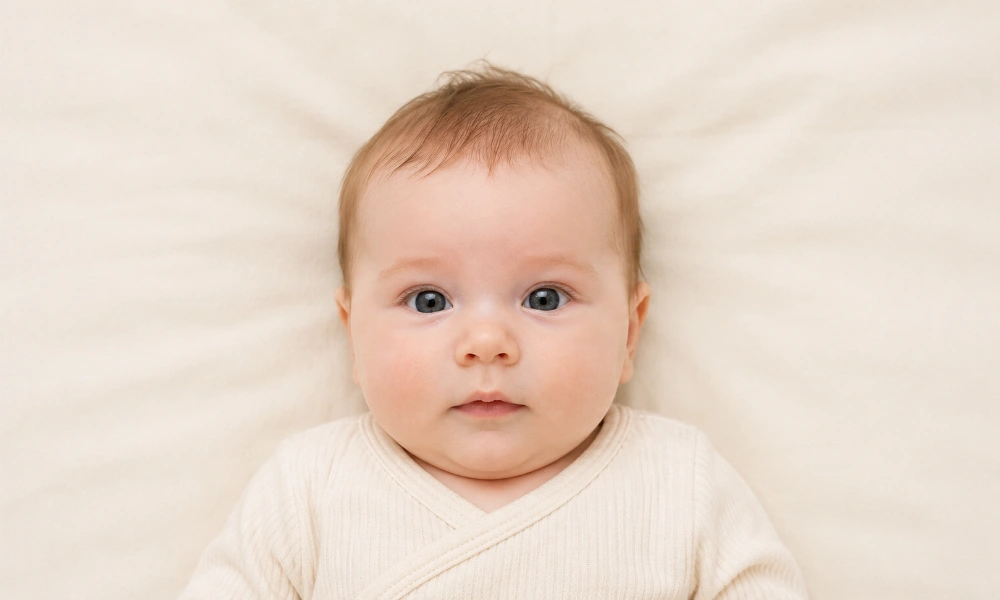
Photos of babies and children follow the same core rules — plain light background, no objects, the child alone — but HMPO sensibly relaxes a few things, because you cannot ask a six-month-old to hold a neutral expression to order.
Children must be alone in the photo. No parent's arm, no siblings, no toys and no dummies.
Children under 6 do not have to look straight at the camera or keep a plain expression.
Children under 1 do not have to have their eyes open.
For babies, lay them on their back on a plain, light-coloured sheet and take the photo from directly above. You can support the head with your hand — but your hand must not be visible in the shot.
Newborn passport photos: the practical method
Newborns are the fiddliest. The over-the-head method on a plain sheet is by far the easiest way to get a clean, shadow-free background. Lay the baby down somewhere with soft, even light, get directly above them so the camera is parallel to their face, and take plenty of frames. Catch them calm and alert if you can, but remember that under-1s do not need their eyes open, which takes the pressure off.
One more thing parents forget: a child's online application can still need a countersignatory and, in some cases, printed follow-ups, even when the digital photo is handled by a code. Keep both routes in mind so a missed signature does not stall things.
Who can sign (countersign) a passport photo?
For some applications, someone has to confirm your photo is a true likeness of you. This person is the countersignatory. You need one for a first adult or child passport, a replacement for a lost, stolen or damaged passport, the renewal of a child's passport for under-12s, and cases where your appearance has changed so much you cannot be recognised from your old passport.
Your countersignatory must:
Have known you (or the adult who signed a child's form) for at least two years.
Be able to identify you personally — a friend, neighbour or colleague, not just someone who knows you professionally.
Be a person of good standing in the community, or work in (or be retired from) a recognised profession.
Live in the UK and hold a current British or Irish passport, if you are applying in the UK.
They cannot be related to you by birth or marriage, in a relationship with you, or living at the same address. On the back of one printed photo they write: "I certify that this is a true likeness of (your title and full name)", then add their signature and the date. You do not sign the photos yourself.
Common reasons passport photos get rejected
A large chunk of submitted photos get bounced, and almost all of it is avoidable. Run through this list before you apply and you will sidestep the lot.
Wrong background. Pure white, too dark, patterned, or not enough contrast with your skin and hair.
Shadows on the face or on the wall behind you.
Smiling or an open mouth. Even a slight smile can fail.
Glasses glare or frames covering the eyes.
Hair across the eyes or covering part of the face.
Wrong head size — face too small or too large in the frame.
Red eye, or eyes not fully open and visible.
Edited photos. Filters, beauty modes and AI enhancements all get flagged.
Old photos. It must be from the last month, every single time you renew.
Where to get a passport photo, and what it costs
You have three realistic options, and the right one depends on how confident you feel and how you are applying.
Photo booths (stations, supermarkets, post offices) — quick and cheap, usually a few pounds, and modern machines offer a digital code for online applications.
Photo shops and pharmacies — a member of staff frames the shot for you and you can get prints or a code. A little dearer, with the highest approval rates.
At home with your phone — free, and perfectly allowed. You carry the risk of getting it wrong, so it suits online applicants who let the system crop and use the free photo checker.
Worth knowing on cost: applying online is cheaper than by post, and taking your own compliant photo rather than paying for a booth shaves another £10 or so off the total. Whichever route you choose, the rules in this guide do not change — nail the background, lighting and expression and the rest tends to follow.
Note: passport fees and processing times changed in 2026, and they tend to rise each spring. Always check the current figures and the latest photo rules on GOV.UK before you apply.
Once your passport arrives: the photos worth keeping
Here is the cheering thought to end on. The passport photo is the dull bit — the gateway to everywhere you are about to go. The photos that actually matter are the ones you take once you are there, and most of them are destined to sit on a phone forever, never printed, slowly buried under newer pictures.
If you would like a few of them to outlive your camera roll, a travel photo book is the easiest way to turn a trip into something you will actually revisit. There is no rush and nothing to buy now — it is just a much better fate for your best holiday shots than the bottom of a folder.
The bottom line
A UK passport photo is fussy, but it is not hard once you know the rules. Get the size right (45mm × 35mm, head 29–34mm), use a plain cream or light grey background, keep a neutral face, ditch the glasses if you can, and make sure the photo is fresh. Run it through the free checker, and your application sails through instead of bouncing back.
Note: this guide is for general information. Passport rules and fees can change, so always confirm the current requirements on GOV.UK before submitting your application.
Frequently Asked Questions
What size is a UK passport photo?
A UK passport photo is 45mm high and 35mm wide — the size produced by standard UK photo booths. Within that frame, your head must measure between 29mm and 34mm from the bottom of your chin to the crown. The photo must not be a cropped section of a larger picture.
What background colour should a UK passport photo have?
A UK passport photo needs a plain, light-coloured background, with cream or light grey recommended. Pure white is not advised — that is the US standard, not the UK one. The background must have no patterns, objects, shadows or other people, and you must be in clear contrast to it.
Can I wear glasses in my passport photo?
You should avoid glasses unless you have to wear them. If you do, they cannot be sunglasses or tinted, your eyes must be fully visible, and there must be no glare, reflection or shadow from the frames or lenses. For most people the simplest solution is to take their glasses off for the photo.
Can I take a passport photo at home on my phone?
Yes. You can take a UK passport photo at home with a smartphone, as long as it meets the rules — plain light background, neutral expression, even lighting and no shadows. For online applications the system crops it for you, so include your head, shoulders and upper body and do not crop it yourself.
What are the digital passport photo requirements?
For an online UK passport application, your digital photo must be at least 600 pixels wide and 750 pixels tall, in colour, and saved as a file between 50KB and 10MB. It must be clear, in focus, taken within the last month, and completely unaltered by photo editing software, filters or AI tools.
How recent does my passport photo need to be?
Your passport photo must have been taken within the last month. This applies even when you renew and your appearance has not changed — you cannot reuse an older photo. HMPO requires a fresh image for every new passport, so always take a new one when you apply.
Can you smile in a UK passport photo?
No. You need a plain, neutral expression with your mouth closed. Even a slight smile can cause a rejection, because biometric checks rely on a consistent, relaxed face. Keep your eyes open and look straight at the camera, without tilting your head in any direction.
What is a UK passport photo code and do I need one?
A photo code is a reference you can get from a participating booth or shop that lets HMPO retrieve your digital photo automatically during your online application. It is optional — you can upload your own compliant photo for free instead. Codes expire after a set period, so use yours promptly.
How many printed photos do I need for a paper application?
You need two identical printed photos for a paper passport application, on plain white photographic paper with no border, creases or marks. One of them may need to be countersigned on the back. If you apply online instead, you submit a single digital photo and need no prints.
Who can sign my passport photo?
A countersignatory must have known you for at least two years, be a person of good standing or in a recognised profession, and (if you apply in the UK) hold a current British or Irish passport. They cannot be related to you, in a relationship with you, or living at your address.
What are the rules for a baby's passport photo?
A baby must be alone in the photo with no toys or dummies, against a plain light background. Children under 6 need not look at the camera or keep a neutral expression, and under-1s need not open their eyes. Lay babies on a plain sheet and photograph from above, keeping your hand out of frame.
Why was my passport photo rejected?
The usual reasons are a white or shadowed background, a smile or open mouth, glasses glare, hair across the eyes, the wrong head size, red eye, or an edited photo. Using the free GOV.UK photo checker before you submit catches most of these problems while they are still easy to fix.