Phone Photography Tips for the World Cup: How to Capture Stadium Night Games
 by Jonathan Vincent
 10 Minutes
Key Takeaways
If you read nothing else, take these six points away with you:
- Switch Night mode OFF for action and goals — its multi-frame stacking creates blur on moving players. Keep it ON for stadium-wide, crowd and walk-in atmospheric shots.
- Burst mode is non-negotiable for goal celebrations — slide the iPhone shutter to the LEFT and hold, or press-and-hold the Android shutter, to fire 10+ frames per second.
- Stabilise the phone with your body, not gear — elbows tucked tight, two-handed grip, brace against any solid surface. Use the volume button as your shutter, never the on-screen one.
- The best stadium shots usually are not of the football — pre-match walk-ins, fan reactions, posed shots with your mates and the final whistle moment age far better than a blurry pitch shot.
- Three edits rescue almost any stadium photo — reduce highlights 30%, lift shadows 25%, cool the white balance 200–400K. Black-and-white sidesteps colour-cast problems entirely.
- Any iPhone 14 Pro, Galaxy S23 Ultra or Pixel 8 (or newer) is more than capable — the iPhone 17 Pro and Pixel 10 Pro lead the low-light league in 2026, but you do not need to upgrade.
A Once-in-a-Generation Tournament — and Most of It After Dark
There is something about a night game. The pitch glows greener under the floodlights. The crowd feels louder. Every shout from the stands carries further. And when the World Cup rolls into the USA, Canada and Mexico in summer 2026, almost every match Brits will care about kicks off in the evening UK time.
England play Croatia at 9pm BST. Ghana at 9pm. Panama at 10pm. Scotland's group games are at 11pm and 3am. Whether you are sat in the stadium itself, watching at a fan zone in Times Square, or on the sofa back home in Sheffield with the curtains drawn — most of your World Cup memories will be made in low light.
And that is genuinely tricky territory for a phone camera.
We will not pretend otherwise. Stadium light is harsh, players move fast, and the pitch is usually further away than you expect. A phone is not a £6,000 sports lens. But it is the camera you will actually have in your pocket — and with the right settings, a few habits, and one or two clever workarounds, modern iPhones and Android phones can produce shots good enough to print, frame and treasure.
This guide walks you through the lot. Phone settings before kick-off. How to handle stadium floodlights. Catching goals on burst mode. Steadying your shot when the bloke in front jumps up. Editing on the train home. And what to do with your favourite shots once the tournament is over.
The 60-Second Quick Start (Read This Bit Even If You Read Nothing Else)
If you only have a minute before kick-off, do these five things:
- Turn on Night mode (iPhone) or pick the equivalent (Pixel: Night Sight; Samsung: Pro mode with raised ISO).
- Set your camera to its main 1x lens, not the zoom. Phone telephoto lenses are awful in low light.
- Turn off the flash. It will not reach the pitch and it makes you the most hated person in your row.
- Lock your exposure on something well-lit before the action starts. Tap and hold on the pitch surface.
- Tuck your elbows in tight against your ribs to steady the phone. That is your tripod.
Right. Now the proper version.

Before You Leave the House: A Quick Matchday Kit
If you are actually making the trip out to North America — or even just heading to a fan zone in town — what you carry matters more than you might think. Stadium photography is a stamina game. Phones overheat. Batteries die. Hands sweat. And the longer you are out, the more useful a properly packed bag becomes.
A personalised tote bag with your team crest, a flag or a photo of the group you are travelling with is the easy answer. It holds a 10,000mAh power bank, a refillable water bottle, your wallet, sun cream and a wired pair of earphones (more on those later) without looking like a school PE kit. And because it is fabric and foldable, it tucks into a jacket pocket once you are inside, so security at the gate is painless.
A small microfibre towel is the second thing most fans forget. North American summer kick-offs can run well above 30°C, and stadium seats are often sun-baked metal until late evening. A personalised gym towel — yes, really — doubles as a sweat-wipe for the hand holding your phone, a cushion against a hot seat, and a way to keep the back of your neck cool during the long queue at the turnstiles. Personalise it with your team's colours or a player photo and it earns its place on matchday and at the gym for the next ten years afterwards.
Phone-wise, the kit is short and sensible: charged phone, charged power bank, short cable, a wired set of earphones if your phone still takes them, and a wrist strap or lanyard so it does not sail out of your hand during a goal celebration. That is genuinely all you need.
Understanding Stadium Light (and Why Your Phone Hates It)
Stadium floodlights look bright to your eyes. They are not, by camera standards. A typical Premier League pitch sits at around 2,000 lux — roughly 1% of the brightness of midday sun outdoors. World Cup venues will be brighter, but they are still working with a fraction of daylight.
That gap is everything for a phone camera. To get a usable exposure, your phone has to do one of three things — and each one creates its own problem:
- Slow the shutter down. Lets in more light, but anything moving — players, the ball, your own hands — turns into a blur.
- Open the aperture wider. Phones cannot really do this. The aperture is fixed, so this option is mostly off the table.
- Crank the ISO up. Lets the sensor work harder, but introduces grain and noise — that fuzzy, dotty look you see in dark shots.
Modern phones are clever about balancing these three. Night modes and computational photography stitch together multiple frames in a couple of seconds to create one cleaner shot. But that takes time. A goal celebration is over in two seconds. The trick is knowing when to use Night mode (the big atmospheric shot) and when to switch it off (the action).
Setting Up an iPhone for Stadium Night Games
Every iPhone from the 11 onwards has Night mode built in, and it has got considerably better with each generation — the iPhone 17 Pro in particular is a serious low-light camera. Here is how to use it without being caught out, regardless of which model you are carrying.
Where to Find Night Mode (and How to Turn It Off When You Need To)
On any iPhone 11 or newer, Night mode comes on automatically when the camera senses low light. You will see a small yellow moon icon at the top-left of the camera screen. Tap it to control how long the exposure runs — from 1 second up to about 10 seconds depending on conditions.
For action shots, you actually want to switch Night mode OFF. Here is the bit nobody tells you: a 3-second Night mode exposure of a player sprinting will give you a streaky mess. To turn it off, tap the moon icon and drag the slider all the way to the left to "Off". You can also swipe up on the camera screen to bring up extra controls if you cannot see it.
Use Night mode for:
- The stadium shot — wide angle of the whole ground before kick-off.
- The crowd around you — fans with flags, scarves, face paint.
- Static moments — the trophy presentation, players posing.
- The ground from the outside as you arrive.
Switch Night mode off for:
- Actual play.
- Goal celebrations.
- Anything where someone is moving fast.
Lock Exposure Before the Action
Tap and hold on a part of the pitch in your shot until you see "AE/AF Lock" appear at the top of the screen. This locks the exposure on the bright pitch surface, which means when the action shifts back to your locked area, the camera does not have to re-meter and miss the moment. It is a small thing that makes a huge difference.
Apple ProRAW (iPhone 12 Pro and Newer)
If you have a Pro model — anything from iPhone 12 Pro through to the current iPhone 17 Pro — and you are serious about your shots, switch on ProRAW in Settings > Camera > Formats. This captures everything the sensor sees in a 12-bit RAW file — far more detail in the shadows, far more flexibility for editing later. Files are huge (around 25MB each on older Pros, closer to 50MB on the iPhone 17 Pro at full resolution), so do not leave it on for the whole match. Switch it on for the moments you really care about.
Setting Up Android Phones — Samsung, Pixel, OnePlus
Android phones handle low light differently depending on the maker. Here is the lay of the land for the three most popular UK phones.
Samsung Galaxy (S20 onwards, including the current S26 Ultra)
Samsung's Night mode is decent, but the secret weapon on Galaxy phones is Pro mode. Open the Camera app, swipe across to "More", and tap "Pro". You can manually control:
- ISO: Try 800 to 1600 for stadium lighting. Higher than that and noise gets ugly. The S26 Ultra handles ISO 3200 cleaner than older Galaxies if you need to push it.
- Shutter speed: Aim for 1/250s or faster for action. 1/500s is better if your phone can manage the exposure.
- White balance: Stadium floodlights have a strong yellow-green cast. Set white balance manually to around 4000K to neutralise it.
For burst shooting, Galaxy phones use a press-and-hold on the shutter button, then drag down to lock burst mode on. You can also map the volume button to burst in camera settings — useful in a tight stand where reaching for the screen is awkward.
Google Pixel (Pixel 6 onwards, including the current Pixel 10 Pro)
Pixel phones have arguably the best low-light performance of any phone right now, thanks to Night Sight. The Pixel 10 Pro takes this further with its larger sensor and improved processing. It is genuinely magical for static scenes — the ground at dusk, the team coming out of the tunnel, fans before kick-off.
But Night Sight uses a 2–6 second exposure window and stacks multiple frames. That is brilliant for the atmospheric shots and pointless for action. Switch Night Sight off (it is a button at the bottom of the camera UI) for goals and play.
Top Pixel Camera tip nobody uses: Long Exposure mode (in Motion settings) actually works in your favour for crowd celebrations. It creates a deliberate motion blur effect that makes a goal celebration look like a renaissance painting.
OnePlus, Xiaomi and Other Android Phones
Most other Android phones have a Pro or Manual mode buried in the camera app. Look for it under "More" or in a swipe menu. The principles are identical to Samsung Pro mode: ISO 800–1600, shutter speed 1/250s or faster, manual white balance around 4000K. If your phone has a "Sports" scene mode, that prioritises shutter speed over everything else and is a perfectly good shortcut.
Stabilisation Tricks: How to Stop Your Photos Looking Drunk
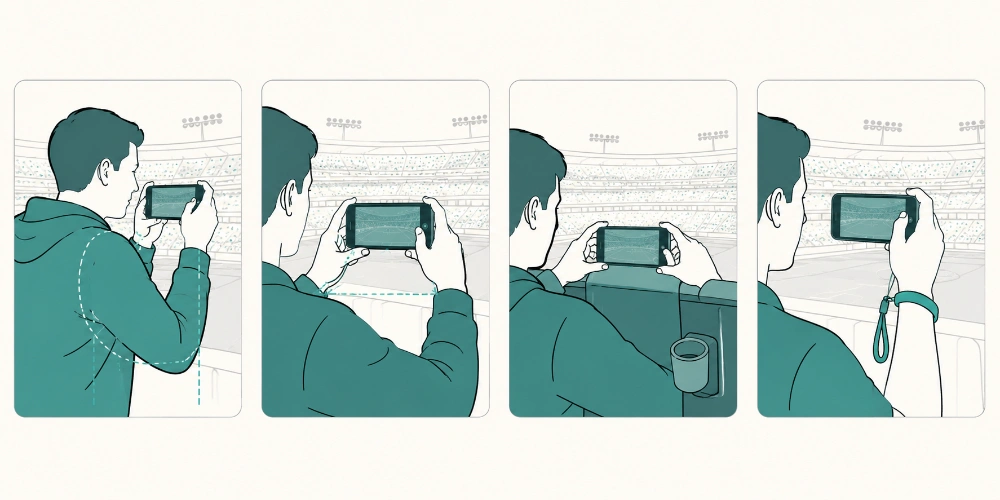
Camera shake is the number one reason your stadium shots look rubbish. The lower the light, the slower the shutter, the more your tiny hand wobble shows up as blur. You do not have a tripod (most stadiums will not let you bring one in anyway). What you do have is your own body.
The Tucked-Elbow Stance
Stand with your feet roughly shoulder-width apart. Pull both elbows in tight against your ribs — properly tight, not a half-hearted brush. Hold the phone with both hands, one each side. Breathe out before you press the shutter. Press, hold for half a second, release.
That little routine alone will save more shots than any amount of fancy kit.
Brace Against Whatever Is Around You
A railing in front of you. The seat back. Your mate's shoulder if they are tall enough. Anything solid that you can lean a hand or wrist against takes shake out of the equation. In an all-seater stadium, the back of the seat in front of you is the perfect prop for an end-of-row aisle shot.
Use the Volume Button as Your Shutter
Tapping the on-screen shutter wobbles the phone every single time. The volume button (either one) takes a photo too, on both iPhone and Android, and the action of pressing it down is far steadier than tapping. It is also faster — handy when something happens you did not expect.
Earphone Cable Trick (Old But Good)
If your phone still works with a wired set of earphones — yes, some of us are still here — the volume button on the cable also works as a shutter. Hold the phone braced against the seat back, dangle the earphone, and click the cable button. It is a remote shutter for free.
Pocket-Sized Phone Tripods
A Joby GorillaPod Mobile or a similar bendy mini-tripod (£15 to £30) folds up to about the size of a Mars bar and fits in any bag. Most stadiums allow these — they are not "professional equipment" by anyone's definition. For the pre-match team photo or the trophy shot, having a phone fixed in place transforms the result.
Catching Goals: Burst Mode Like You Mean It
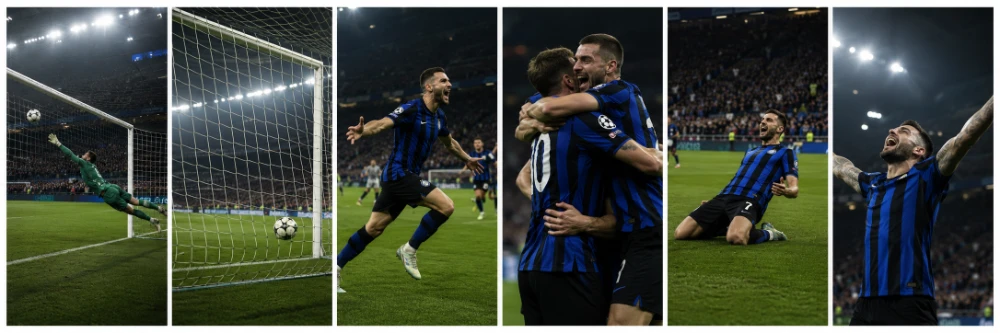
Goals happen in milliseconds. The shot you actually want — the player's face mid-roar, the keeper sprawled on the deck, the captain pointing at the ref — is one specific frame inside a chaotic two-second window. Single-shot photography cannot reliably hit that frame. Burst can.
When to Start the Burst
Train yourself to start firing the moment the ball goes into the final third, not when it crosses the line. By the time you have processed "that's a goal" the celebration has already happened. Keep your finger on the burst slider any time the attacking team is in dangerous territory.
You will burn through storage. That is fine. Storage is cheap, World Cup goals are not.
Burst on iPhone
Slide the shutter button to the LEFT and hold. The counter at the bottom shows how many frames you have captured. When you stop sliding, burst stops. To find your bursts later, open the Photos app, go to the Bursts album, tap your burst, and pick the keepers.
Burst on Android
Press and HOLD the shutter button. On Samsung, you may need to drag down to lock burst on for longer sessions. On Pixel, hold and the camera fires; lift to stop. Review the results in the Camera app or Google Photos and delete the misses.
Pick the Keepers Ruthlessly
Out of 25 burst frames, you might keep 2 or 3. Be brutal. The moment you keep half-decent shots out of guilt, your camera roll becomes unsearchable. Pick the very best frame, save it, delete the rest of the burst.
And that one perfect frame — the keeper mid-flight, the ball crossing the line, the striker frozen with arms wide — deserves a better fate than a buried camera roll. A really sharp burst keeper is the kind of shot that ends up on a personalised photo mug. The first brew of the morning, your team's biggest moment on the side of the cup — it is a daft, daily, useful kind of reminder that hits different to a screensaver. You can do one for yourself and a matching one for whoever you watched the goal with. The looks on their faces when they unwrap it on Christmas Day is half the fun.
Avoiding Blurry Crowd Shots
Crowds are tough. Half the people are moving, the lighting is even darker than the pitch, and your camera has nothing obvious to focus on. Three things make a real difference here.
Tap to Focus on a Specific Face
Phones default to focusing on the centre of the frame, which in a crowd shot is often a sea of indistinct shoulders. Tap on a specific face — your mate, the bloke with the flag, the kid on his dad's shoulders. Your phone will lock focus there and the rest of the shot will fall into a pleasing depth of field.
Time Your Shot to a Pause
Crowds are not constantly moving. There are micro-pauses — between songs, after a cleared corner, just before the ref blows up. Take your shot in those gaps and you avoid the worst of the motion blur.
Use a Slightly Higher ISO
On Android Pro mode or iPhone with a third-party app like Halide, push ISO up to 1600 or even 3200 for crowd shots. Yes, you get more grain. But grain in a packed-stand celebration shot looks atmospheric — like proper match-day photography. A blurry shot looks like a mistake. The trade-off is worth making.
Capturing the Atmosphere — Not Just the Football
Honestly, the best stadium photos are rarely of the actual football. They are of the moments around the football. The sea of red and white as you walk in. Your dad shaking his head after a near miss. A complete stranger you ended up hugging when the equaliser went in. Those are the photos you will print, frame and look back on in twenty years.
Pre-Match: The Walk-In
Get to the ground at least an hour before kick-off. The light around dusk — the "blue hour" between sunset and full dark — is genuinely beautiful, and stadiums look magical against a deep blue sky. The exterior shot of the venue with floodlights kicking in, fans streaming towards the gates, scarves overhead — these shots almost take themselves.
If you are actually making the trip out to North America, start thinking now about how you want to remember the whole thing. Walk-in shots are the bread and butter of a proper post-tournament photo book — the scene-setter before each match chapter. Take more of them than you think you need. You will thank yourself when you are laying out pages on a wet November evening, with a cup of tea, replaying the whole summer in your head. A proper photo book is the difference between a tournament you photographed and a tournament you actually remember.
Our guide to making a travel photo book covers themes, page layouts and how many photos to include if you have not made one before.
The Tunnel Walk
When the players come out of the tunnel, the lights typically dim and a spotlight or pyrotechnics fire. Switch to your standard photo mode (NOT Night mode), pre-focus on where the players will appear by tapping that spot on screen, and burst as they emerge.
Pyrotechnics and Flares
Drop your exposure manually. Pyro is incredibly bright, and on default settings your phone will blow it out into a featureless white blob. Tap on the brightest part of the flare to set focus, then drag the little sun icon DOWN by about a third. Now the flare retains its colour and the people around it stay visible.
Reaction Shots
Turn your camera around. Some of the best photos at a World Cup are not of the pitch — they are of the people next to you reacting to what is happening on the pitch. Keep one eye out for the photogenic super-fan three rows in front. Their reactions tell the story of the match better than any wide shot of 22 blokes running about.
The Final Whistle
Whatever the result, do not put your phone away. The 30 seconds after a final whistle — players consoling each other, fans on their feet, the manager applauding the away end — is the most emotionally rich phase of any match. Keep shooting.
The wide one — the whole stadium going up, scarves overhead, the entire away end on its feet — is the shot you will share most. Get a few clean versions of it. Different angles if you can. You will use that photo more than any other from the trip.
Composition Tips That Work for Phones
Use the Grid
Turn on the camera grid (iPhone: Settings > Camera > Grid; Android: Camera Settings > Grid Lines). The "rule of thirds" is photography 101 for a reason — placing your subject on one of the four intersection points where the lines cross almost always looks better than dead centre.
Get Low When You Can
If you have an aisle seat or are standing at the back, drop your phone down to chest or even waist height. A low-angle shot of celebrating fans with the floodlights overhead has serious drama to it. A mid-chest viewpoint is also more flattering for portraits — people look more heroic from below.
Shoot Wide, Crop Later
Resist the temptation to zoom in. Phone digital zoom destroys image quality, and stadium light makes that destruction worse. Shoot wide on the main 1x lens, then crop in afterwards on your phone. The detail will be sharper than if you had zoomed at the moment of capture.
Negative Space
A single fan with a flag, framed against an empty section of stadium, often makes a stronger photo than a packed crowd shot. Look for those quieter compositions — they tend to print far better at large sizes.
The Posed Group Shot
At least once in the day — outside the ground before kick-off, half-time pint in hand, on the concourse — get a posed shot with the people you came with. Properly posed. Phone on a railing or in a mate's hand at chest height, everyone in shot, no half-bodies. These are the photos that age best.
A clean group shot in matching kit is also one of the most giftable photos you will take all summer. A personalised photo keyring with the group photo on one side is the small, daft, useful kind of memento mates actually keep. Light enough to clip to a rucksack zip or a set of keys, personal enough to mean something. Order one for each of the lads you went with and you have got Christmas sorted in August. They will pull it out at the pub years from now.
Editing Your Photos on the Train Home
Half the magic of a great match-day photo happens in the editing. Stadium lighting is rarely flattering straight out of the camera — too yellow, too contrasty, slightly grainy. Twenty minutes with a free editing app and you will have a printable shot.
Free Apps That Actually Work
- Snapseed (free, iOS + Android): The Selective tool lets you brighten only the dark parts. Brilliant for lifting shadows on faces while keeping the floodlit pitch from going too white.
- Lightroom Mobile (free version, iOS + Android): Brilliant for fixing white balance — drag the temperature slider away from yellow towards blue and stadium photos suddenly look cinematic.
- VSCO (free, iOS + Android): Has a great preset called "A6" that gives stadium shots a moody filmic feel. Apply at 60–70% strength.
Three Edits That Save Almost Every Stadium Photo
- Reduce highlights by about 30%. The blown-out floodlights and bright shirts come back into the picture.
- Lift shadows by about 25%. Faces and crowd detail emerge from the dark.
- Cool the white balance slightly. Stadium tungsten lights cast everything yellow — pulling the temperature 200–400K cooler removes the sickly tint.
That sequence alone will rescue 90% of the photos you took.
For deeper editing tips that translate well to print, our guide on how to edit photos for printing covers contrast, sharpening and saturation in plain language.
Convert to Black-and-White When Colour Lets You Down
Stadium light is fundamentally compromised. Yellow-green floodlights mixed with red-blue advertising LEDs create colour casts no editing app can fully fix. Black-and-white sidesteps the whole problem. Some of the most iconic football photographs of all time are monochrome, and a B&W edit of a goal celebration can look genuinely classic.
Use the B&W presets in Snapseed or Lightroom Mobile and bump the contrast up by 15–20%. Stadium photos respond brilliantly to a high-contrast monochrome treatment.
Don't Let These Photos Disappear Into Your Camera Roll
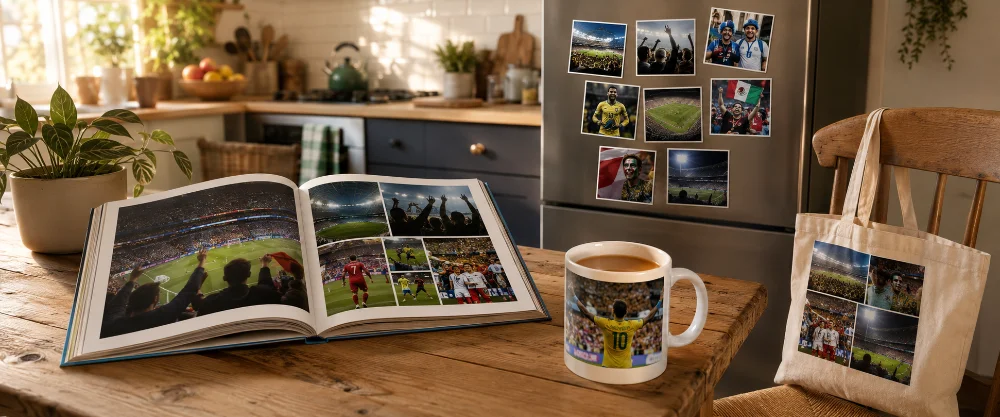
Here is the bit nobody plans for. The tournament ends, you scroll back through your camera roll a couple of times in July, and then those photos slowly disappear into the digital void of your phone — buried under takeaway receipts and screenshots of train tickets. Six months later you cannot find them.
A phone is the worst place to keep a memory you actually care about. Pick out the ten or fifteen shots that genuinely meant something. Get the very best ones onto a wall, into a book, on a shelf — somewhere you will actually see them. That is the difference between a tournament you photographed and a tournament you remember.
The easiest, cheapest way to keep the best shots in your daily eyeline is fridge magnets. MixMags photo magnets let you put a handful of your favourite match-day shots straight on the fridge, the side of the dishwasher, or any metal surface in the kitchen. Small enough not to dominate, big enough to actually see. Every morning when you reach for the milk, there is the keeper's eyes, the equaliser, your dad's grin. Eight magnets cost less than a round of drinks at the ground and the memories sit there for years.
And once you have done that, finish the job with a photo book of the trip and a mug or two with the best frame on the side. The whole point of a tournament like 2026 is that the moments matter. Get them off your phone.
Final Whistle
A World Cup is a once-in-four-years thing. First time it has been hosted across three nations, first time it has expanded to 48 teams, first time most of the action has been beamed back to the UK in evening prime time — is genuinely a once-in-a-generation event.
Your phone is good enough. Modern smartphone cameras under stadium lights are capable of producing properly print-worthy shots, especially if you set them up sensibly, hold them steady, and pick your moments. None of the techniques in this guide need new kit, none of them need photography lessons, and most of them you can practise at any league match before the tournament starts.
Get your settings right before kick-off. Tuck your elbows in. Burst on the goals. Edit on the train home. And when the dust settles in late July, do the most important thing of all — get the best ones off your phone and onto something you can actually look at.
Happy shooting. Come on, you Three Lions. (And Tartan Army. Sorry, Wales — next time.)
Frequently Asked Questions About World Cup Phone Photography
-
Mostly, yes. A modern smartphone (iPhone 14 Pro onwards, Galaxy S23 Ultra onwards, Pixel 8 onwards) shoots at around 12 megapixels by default, which prints cleanly up to about 50×40cm. For larger sizes, switch your phone to 48MP or 50MP mode if it has one — the iPhone 17 Pro and S26 Ultra both shoot at full 48MP / 200MP modes that hold up at much larger formats. Phone shots from a stadium are rarely sharper than the lens itself, so going beyond 80×60cm is asking a lot — but for most printed gifts and book pages, your phone is plenty.
-
Phones are fine everywhere. Compact cameras are usually fine. Cameras with detachable lenses (DSLRs and mirrorless) are typically prohibited at World Cup matches without media accreditation, in line with most major sporting events. The exact rules sit on each match's ticketing terms — check before you travel rather than assuming. For 99% of fans, your phone is what you will be shooting on anyway.
-
Honestly, probably not. Phone clip-on lenses (Moment, Olloclip and similar) work brilliantly outdoors in good light, but in a stadium they introduce extra glass between sensor and subject and degrade low-light performance. Stick to your built-in main lens. The exception is if you are shooting from the very top tier of a huge stadium and you want a reach extender — a 2x telephoto lens add-on can help, but expect noisier results.
-
Stadium phones overheat because of three things: high ambient temperature, recording lots of video, and the screen running at full brightness. For a hot North American summer kick-off, drop your screen brightness, take stills not video for the first 70 minutes (save video for the last 20), and pop your phone back in your pocket between exciting moments. If it does start throttling, take it out of any case for 5 minutes — phone cases trap heat. A damp microfibre towel laid over the phone briefly while it cools down works wonders too.
-
They do different jobs. Video captures the noise, the chaos, the way everyone is shouting different things — properly visceral. A photo gives you one frozen moment that you can print, frame and look at for years. Our advice: shoot video on the big moments, but always burst-fire stills as well. You can pull a still frame from a 4K video later, but the quality will not match a proper burst shot.
-
Always off. Always. Phone flashes have a useful range of about 3 metres in dark conditions — they will not reach the pitch, will not reach the next stand, and will only succeed in lighting up the back of the head of the bloke in front of you. They also wreck your phone's exposure metering. Off, every time.
-
Use a wrist strap or a lanyard case. Stadium drops are common — phones get knocked over barriers, slip out of pockets when people stand up, sail out of hands during goal celebrations. A £5 phone strap that loops around your wrist saves a £900 phone. Also a battery pack: heavy photo and video use plus mobile data plus heat will drain a battery before half-time. Carry a 10,000mAh power bank in your bag, alongside a short cable. Most stadiums allow soft-sided bags of a reasonable size, so a foldable tote works far better than a rucksack at the gate.
-
You can, but be careful. Live Photos record 1.5 seconds of video before and after the photo, which means in low stadium light, your phone is constantly running its sensor at higher power and your battery suffers. They also create a lot of fairly poor-quality video clips you do not really want. For action and goals, switch Live Photos off (the dotted-circle icon at the top of the camera). For posed shots with mates, leave them on — Live Photos let you pick a different "key photo" frame from the burst, which often saves a blink or a yawn.
-
No single right answer, but here is the honest take. The Pixel 10 Pro and iPhone 17 Pro are level-pegging at the top of the low-light league. Samsung Galaxy S26 Ultra has the best telephoto zoom for distance shots from the top tier, but its main sensor is roughly comparable to the Pixel's. If you are upgrading specifically for the World Cup and low-light performance is your priority, a Pixel 10 Pro is hard to beat. If you already have an iPhone 14 Pro or Galaxy S23 Ultra or newer, save your money — those phones produce stadium photos perfectly well.
-
Most decent online printing services let you upload directly from your phone storage, no app required. Open your phone's browser, go to the printing service's site, choose the product, and tap "upload" — your phone will offer up its photo library.
-
Two to know about. First, rules prohibit broadcasting live commentary or live video to commercial platforms during matches — fine for personal social media, not fine if you are running a paid live stream. Second, some venues have specific rules about flash and tripods even for phones, so a bendy mini-tripod might get politely confiscated at the gate. Read the venue rules a couple of days before, not at the turnstile.
-
Genuinely, yes — at least if you are travelling to North America in summer. A small microfibre towel weighs almost nothing, dries in minutes, and does about four jobs across a match-day: sweat-wipe, seat cushion on hot bleachers, neck-cool in queues, and impromptu camera wipe if your phone gets a splash from a thrown drink. The personalised ones look a lot more presentable than a hotel flannel and they double up at the gym afterwards. Not essential, but one of those things you only forget once.